
0

Publish a Page
Purpose
Explain publish workflow, validation checks, approval expectations, and confirming the live page after publish.
What this page teaches
- Generic publishing workflow - Note your site may vary
- Publish only after content, layout, links, media, metadata, and approval checks are complete.
- Explain direct publish versus approval workflow.
- Confirm the live page after publishing.
Basic workflow
- Validate your content for accessibility & inclusivity
- Validate links in your content
- Spell check your content & check your grammar
- Complete other content and metadata checks
- Preview the page on desktop and mobile
- Select Publish or Submit for Approval if your site has a publishing workflow that requires review
- Use Publish only when authorised and ready
- Open the live page after publishing
- Confirm the live page shows the expected version
How to Publish your Page
- Navigate to the content
- Click the Publish Button
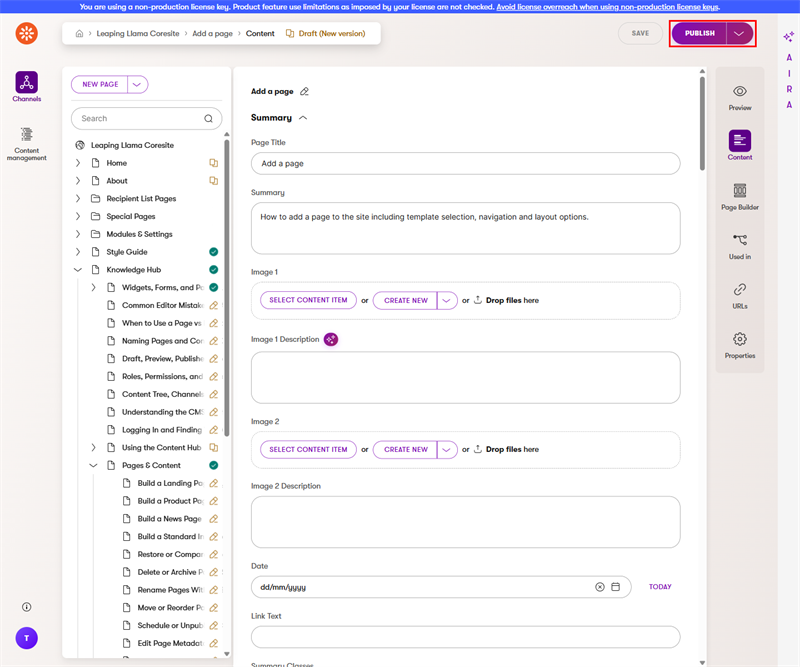 Publish button is at the top right of the interface for all sections of the page where content can be edited.
- You can either Publish now or Schedule a publish
Related Articles
Login Panel
Home
- About
-
Research
-
Our research
- Col Reynolds Fellowships
- Our research investment
-
Currently funded projects
- PhD Scholarship recipient, Jasmine Jin
- Dr Lee Wong
- Professor David Eisenstat
- Dr Jordana McLoone
- Professor Simon Conn
- Professor Bryan Day
- Dr Evangeline Jackson
- Dr Michelle Tennant
- Dr Ryan Cross
- Dr Emmy Fleuren
- Dr Noemi Fuentes-Bolanos
- Ms Rachel Edwards
- PhD Scholarship recipient, Lorna McLeman
- PhD Scholarship recipient, Bryce Thomas
- PhD Scholarship recipient, Chelsea Valentin
- Professor Rishi Kotecha Interfant 21 Clinical Trial
- Professor Matt Dun
- Dr Kate Vandyke
- Professor Richard D'Andrea
- Dr Aaminah Khan
- Dr David Mizrahi
- Dr Karin Plummer
- Dr Kenny Ip
- Dr Katherine Pillman
- Dr Teresa Sadras
- Dr Noa Lamm-Shalem
- Dr Rachael Lawson
- Dr Marion Mateos
- Dr Joseph Yuan-Mou Yang
- Jacqueline Hunter
- Dr Hannah Walker
- Dr Tessa Gargett
- Dr Klaartje Somers
- Dr Jacqui McGovern
- Dr Elizabeth Connolly
- Associate Professor Geoff McCowage
- Professor Nick Gottardo
- Comprehensive analysis of gene changes in childhood cancer patients and their parents
- Col Reynolds Fellowships, Megumi Hui Ai Lim
- Towards safe and effective immunotherapy for soft tissue sarcomas
- Training Natural Killer cells for Immunotherapy for children, adolescent, and adults with sarcoma
- Col Reynolds Fellow, Philipp Graber
- A new and effective combination therapy for children with brain cancer
- Utilising cord blood-derived Natural Killer cells to prevent post-transplant relapse in Childhood Leukaemia
- Identification of Megakaryocyte and Platelet Bone Marrow Niches
- Clinical translation of CAR T cell therapy for the treatment of sarcoma
- RECOVER – Responding to late effects in survivors of childhood cancer
- Preclinical drug-testing to evaluate PARP inhibitors for infants with acute lymphoblastic leukaemia
- (GENIE) A combined GENetic and follicle density risk prediction approach to identifying InfErtility risk in paediatric cancer patients
- Pharmacogenetics real-time implementation of rare-toxicity predisposition (PRIORITY-P)
- iBounce digital health educational program
- Targeting the thioredoxin system as a novel strategy for DIPG
- Identification of a sarcoma molecular prognostic and therapy resistance signature
- Pharmaco-phospho-proteo-genomics of paediatric high-grade glioma (HGG)
- Reducing long-term side-effects of chemotherapy in cancer survivors
- Exploiting the DNA damage response in paediatric sarcoma
- Detecting chemotherapy resistance and sequencing residual malignant tissues in sarcoma treatment
- Targeting altered serine metabolism in MLL-rearranged paediatric acute myeloid leukaemia (AML)
- Enhancing radiation therapy to improve survival outcomes for children with aggressive brain cancer
- Identifying the right sarcoma treatment at the right time
- National Tumour Biobanking Network
- Targeting IL-23 in bone and soft tissue sarcomas
- Enhanced polyamine depletion for aggressive childhood cancers
- Personalised targeted therapy for adolescent and young adult medulloblastoma patients
- Application of gene-silencing nanodrugs to inhibit medulloblastoma growth
- Reboot-Kids
- Pre-clinical anti CD-47 therapy
- Targeting Polo-like kinase 1 as a novel therapeutic opportunity for diffuse intrinsic pontine glioma
- The NORTH Trial
- "Cage fighting" with neuroblastoma
- Intraoperative immunotherapy to prevent relapse in soft tissue sarcoma
- Using smarter new drugs to reduce long term debilitating side effects for aggressive childhood brain
- International clinical trials support
- Personalised Medicine: Zero Childhood Cancer
- Exploiting CDK4/6 inhibition to treat medulloblastoma
- Targeting the NAD pathway as a new therapeutic strategy for high-risk leukaemia in children
- IntReALL-HR
- Understanding the genetic basis of chemotherapy-induced cardiomyopathy
- New state-wide Children’s and Adolescent/Young Adult Cancer Clinical Trials Unit
- Pre-clinical development of novel immune therapy for paediatric cancers
- Investigating drug resistance and genetic changes in Ph-like ALL in adolescents
- Epigenetic targeted therapy in DIPG
- Impact of treatment on late effects and survivorship on childhood cancer survivors
- Developing treatments for vincristine-induced neuropathy
- Development of a non-invasive diagnostic and prognostic assay for adolescent testicular cancer
- MicroRNA drugs for the treatment of neuroblastoma
- 3D printers and mini-brains
- Overcoming therapeutic resistance in high risk ALL using novel BH3 mimetic
- Using targeted chemotherapies to reduce intensity of radiotherapy in medulloblastoma
- New therapies for incurable paediatric brain tumours
- Combinational therapeutics in high-risk infant acute lymphoblastic leukaemia
- Reversing glucocorticoid resistance in paediatric acute lymphoblastic leukaemia – a novel epigenetic
- Ready, Steady, School
- Targeting FACT to inhibit MYCN-driven transcription in neuroblastoma
- Exploring better and safer treatments for osteosarcoma
- Therapeutic targeting transcriptional addiction in paediatric leukaemias
- Synthetic retinoid therapy for diffuse intrinsic pontine glioma
- Development of CAR T cell immunotherapies for paediatric patients
- Development of personalised medicine approaches to treat medulloblastoma
- Novel therapies for diffuse intrinsic pontine glioma (DIPG)
- Improving chemotherapy regimens for medulloblastoma
- Next gen sequencing to identify gene mutations in childhood cancer patients
- New therapeutic targets for paediatric medulloblastoma
- Novel targets to treat medulloblastoma
- Personalised disease monitoring in childhood AML
- Re-engage
- Improving treatments for infant acute lymphoblastic leukaemia (iALL)
- International DFMO clinical trial
- Drug discovery project
- Treatment of solid paediatric cancers with tropomyosin targeted therapy
- Tumour Bank at CHW
- Developing novel immunotherapies for childhood blood cancers
- Stathmin regulation of microRNA expression in neuroblastoma cells
- Bio-banking and personalised medicine software platform
- Improving the cure rates of childhood brain cancer
- Switching off genes
- Clinical trial of new treatment for relapsed neuroblastoma
- Evaluating potential side effects of anti-tropomyosins
- Cytoskeletal regulation of adhesion dynamics in neuroblastoma metastases
- Our funding
- Our impact
- Our resources
-
Our research
- Ways to help
- Corporate partnerships
-
Shop
-
Donate or buy a Bear
- Paddy's Presents Bundle
- Christmas Bear
- Magical Christmas Bear Bundle
- Christmas Full Bear Bundle
- Baby Activity Bear
- Luna Unicorn
- Sammy Superhero Bear
- Ollie Puppy
- Omega Sleepy Bear
- Deedee Dinosaur
- Hospital Favourites Bear Bundle
- Baby Bundle
- Boy and Girl Bear Bundle
- Fantasy Bear Bundle
- Ollie Puppy Matching Sock Bundle
- Full Bear Bundle
- Accessories
- Apparel
- Shopping Cart
-
Donate or buy a Bear
- Style Guide
-
Knowledge Hub
- Getting Started
-
Website Pages & Content
- Prepare for Authoring
- Anatomy of the Page
- Navigating the Pages & Content Interface
- Add a page
- Choose the Correct Page Type
- Editable Page Components
- Preview a Page
- Publish a Page
- Schedule or Unpublish Content
- Edit a Published Page
- Page Properties
- Edit Page Metadata
- Copy Sections or Widgets between Pages
- Update the Header Image of a Page
- Use Columns on a Page
- Rename Pages Without Breaking Navigation
- Move or Reorder Pages
- Restore or Compare Older Versions
- Page Templates
-
Using the Content Hub
- Adding Videos
- Adding Files
- Adding Documents
- Images - Addition and Bulk Upload
- Media and File Asset Management
- Finding Existing Content Before Creating New Content
- Image Asset Naming and Replacement
- Document and File Asset Naming
- Video Asset Management
- Creating Reusable Content Items
- Using Reusable Content on Pages
- Editing Reusable Content Safely
- Retiring or Replacing Old Shared Content
-
Widgets, Forms, and Page Builder
- Current Widget Catalogue
- Page Builder Sections
- Custom Rich Text Widget
- Content Chunk Widget
- Image Widget
- Compilation Widget
- Slider Widget
- Content Expander Widget
- Video Widget
- Flipbook Widget
- Thumbnail Gallery Widget
- Section Submenu Widget
- Breadcrumb Widget
- Forms Overview
- Additional Form Fields
- Portal Form Editing
- Form Display Extensions
- File Upload Form Fields
- HCaptcha and Spam Protection Basics
- Navigation, Search, and Metadata
- Author Layout Reference
- Email Marketing Channel
- Administration
- Development
- Client Specific Training Notes
-
Test Area
- Page Templates
- General Content Tests
- Text Styles
- Sub Menu
- Expandable Sub Menu
- Colors
- Columns Layouts
-
Content Collections
-
Test Articles
- This Item Has Summary Classes
- Not Linked to Anything - Redirection
- Not Linked to Anything
- Sample Company Launches Outstanding New Website
- This Story Does Not Appear on the Latest Updates Collections
- This is a Page Fragment Without a Redirection URL
- A News Story in the Headlines Area
- Llamas 'R' Us: The One-Stop Shop In a World Where Llamas Rule the Retail Roost
- Merry Christmas for 2024
- Article for Testing No Summary Image
- Like Water Beading On a Leaf
- Page Link to About Us Page
- Mmmmm Chocolate Cake
- Link to About Page
- This Article Might Have a Widget On It
- Test Article
- Another Article for Testing
- My New Article Wheee!
- Test Profiles
- Test Products
- Test Events
- Cards
- Cards in One Column Template
- Carousels
- Three Columns Collection
- Two Columns Collection
- Collection: Tag Filters
- Date Handling
- Link Cover
- Masonry Columns
-
Paging and Filter
- Lorem Ipsum Dolor Sit Amet
- Gladia Was in Space Again
- Fishing is the Activity of Hunting for Fish
- Ut Enim Ad Minim Veniam
- Quis Nostrud Exercitation
- Occaecat Cupidatat Non Proident
- Ullamco Laboris Nisi Ut Aliquip
- Green - Ullamco Laboris Nisi Ut Aliquip
- Sunt In Culpa Qui Officia
- Consectetur Adipisicing Elit
- Dolor In Reprehenderit
- Incididunt Ut Labore
- Mollit Anim Id Est Laborum
- Fugiat Nulla Pariatur
- Copy of Lorem Ipsum Dolor Sit Amet
- Copy of Gladia Was in Space Again
- Copy of Fishing is the Activity of Hunting for Fish
- Copy of Occaecat Cupidatat Non Proident
- Postcards
- Timeline
- Tiles
-
Test Articles
-
Content Elements
- 5 Star Ratings
- Alert Boxes
- Attachments
- Boxes
- Boxes (Advanced)
- Buttons
- Carousels
- Cycle Content
- Expanders
- HTML Elements
- Icons
- Image Backgrounds and Parallax
- Image Captions
- Inline Images
- Image Optimisation
- Image Responsivity
- Jump to Expander or Tab
- Lists
- Personalization Test
- Quotes
- Quotes - Blockquotes
- Ratios
- Sections, Content Area and Columns
- Tabs
- Forms & Surveys
- Front end editing
- Grid Layouts
- Links
- Tables
- Widgets
- Kentico X Leaping Llamas Website (Redirect)
The Kids Cancer Project web site uses cookies to improve the user experience. Click here for more information.